How Do Filing Status and Location Affect Take-Home Pay?
Filing status and location play a major role in determining taxes and take-home pay. Filing status affects tax brackets, deductions, and credits, while location determines state and local taxes. Two people earning the same salary can have very different net income due to these factors. A take-home pay calculator uses this information to adjust tax calculations and improve accuracy. Ignoring these details often leads to misleading results. Including them helps users understand why their take-home pay differs from others and supports better financial planning when life changes affect filing status or residence.
How Does Filing Status Change Tax Liability?
Filing status determines which tax brackets and deductions apply to your income. Common statuses include single, married filing jointly, married filing separately, and head of household. Each status has different tax thresholds and standard deductions. For example, married couples filing jointly often benefit from higher income thresholds before reaching higher tax rates. Filing status can significantly change total tax owed and take-home pay. A take-home pay calculator adjusts tax estimates based on selected filing status, helping users see how life events like marriage or separation affect net income and overall tax responsibility.
How Do State Income Taxes Affect Your Salary?
State income taxes reduce take-home pay by applying additional tax rates to earnings. Some states use flat rates, while others use progressive systems similar to federal tax. High-tax states can reduce net income noticeably, even for moderate salaries. State taxes also vary in how they treat deductions and credits. A take-home pay calculator includes state tax estimates to reflect these differences. Understanding state tax impact helps workers evaluate job offers, plan relocations, and budget accurately. Without this information, net income estimates can be off by a large margin.
Which States Have No Income Tax?
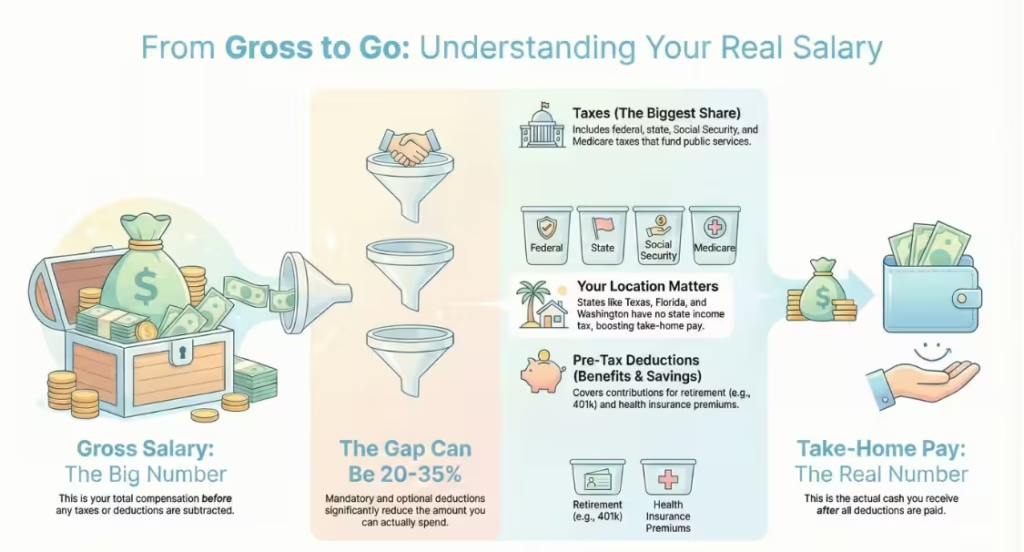
Some states do not charge personal income tax, which increases take-home pay for residents. These states include:
State | Income Tax |
Texas | None |
Florida | None |
Washington | None |
Nevada | None |
Wyoming | None |
South Dakota | None |
Living in these states can result in higher net income compared to states with income tax. However, other taxes such as sales or property tax may be higher. A take-home pay calculator reflects the absence of state income tax, helping users see how location affects their paycheck.
What Are Pre-Tax Deductions and How Do They Reduce Taxes?
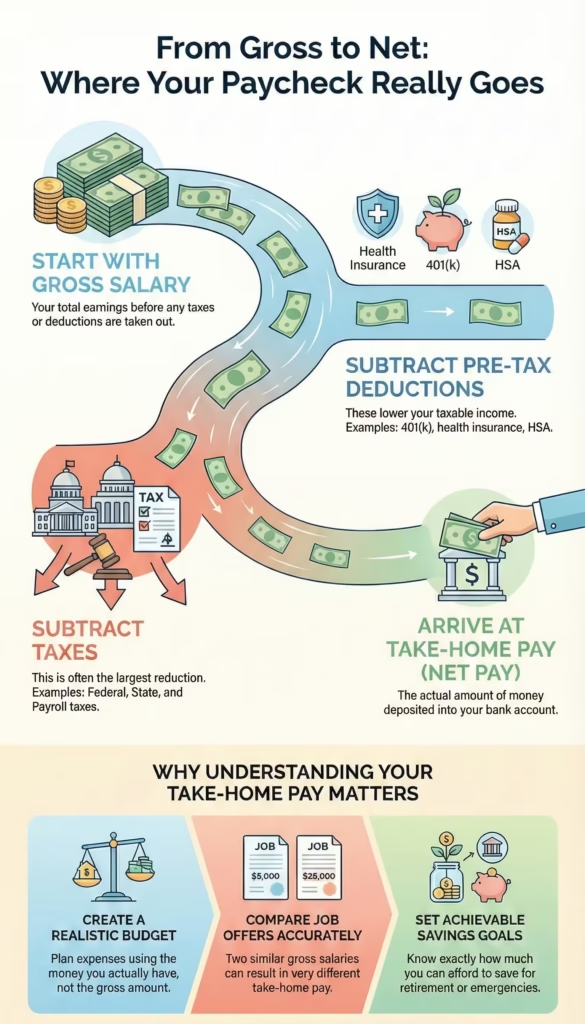
Pre-tax deductions are amounts taken from your salary before taxes are calculated. These deductions lower taxable income, which reduces total tax owed. Common examples include retirement plans, health insurance, and health savings accounts. While pre-tax deductions reduce immediate take-home pay, they often lead to long-term savings or benefits. A take-home pay calculator shows how these deductions affect both taxes and net income. Understanding their impact helps users balance current cash needs with future financial goals. This section fills an important gap by explaining why deductions matter, not just listing them.
How Does a 401(k) Contribution Affect Take-Home Pay?
A 401(k) contribution reduces taxable income by redirecting part of your salary into a retirement account. This lowers federal and state tax owed, which softens the reduction in take-home pay. For example, contributing 6% of salary does not reduce take-home pay by the full 6% because taxes are lower. Many employers also offer matching contributions, increasing total compensation. A take-home pay calculator helps users see how different contribution levels affect net income, making it easier to save for retirement without hurting monthly cash flow more than expected.
How Do Health Insurance Premiums Reduce Taxable Income?
Health insurance premiums are often deducted before taxes, reducing taxable income. This lowers federal and payroll tax amounts, which partially offsets the cost of coverage. While premiums reduce take-home pay, they provide essential healthcare protection and tax savings. The actual impact depends on plan cost and salary level. A take-home pay calculator includes health insurance deductions to show their real effect on net income. This helps users compare plans and understand how insurance choices influence both paycheck size and overall financial security.
How Do Dental and Vision Plans Impact Net Salary?
Dental and vision plans usually cost less than health insurance but still affect take-home pay. These premiums are often pre-tax, which reduces taxable income slightly. While the paycheck impact is smaller, these plans provide coverage for routine care that can prevent higher medical costs later. A take-home pay calculator includes these deductions to give a complete picture of net income. Understanding their effect helps users decide whether the coverage value outweighs the paycheck reduction. Including these details avoids underestimating deductions and improves budgeting accuracy.
How Does an HSA Contribution Provide Tax Benefits?
An HSA contribution offers multiple tax benefits. Contributions reduce taxable income, funds grow tax-free, and withdrawals for medical expenses are not taxed. This makes HSAs a strong option for those with eligible health plans. While contributions reduce take-home pay in the short term, they provide long-term savings for healthcare costs. A take-home pay calculator shows how HSA contributions affect net income and taxes, helping users choose contribution levels that fit their budget. Understanding this benefit helps users make informed decisions about healthcare and savings without relying on assumptions.
How Do Bonuses and Additional Income Affect Take-Home Pay?
Bonuses and additional income can increase your total earnings, but they also raise your tax liability. Many people assume extra income equals extra cash, but taxes often take a larger share than expected. Bonuses, overtime, and side income are usually taxed differently from regular salary, which can reduce the final amount received. A take-home pay calculator helps show the real impact of extra income by applying the correct tax rules and deductions. This clarity helps users decide whether extra work or income sources align with their financial goals. Understanding how additional income affects take-home pay prevents unrealistic expectations and supports smarter planning around savings, debt, and lifestyle choices.
How Are Bonuses Taxed Differently From Regular Salary?
Bonuses are often taxed at a higher rate than regular salary due to payroll withholding rules. Employers commonly apply a flat withholding rate to bonuses, which can feel like over-taxation. This does not always mean you owe more tax overall, but it does reduce the immediate payout. Bonuses are also fully taxable income and increase your annual earnings, which may push part of your income into a higher tax bracket. A take-home pay calculator shows how a bonus affects total taxes and net income over the year. This helps users understand the difference between withholding and actual tax liability and plan how to use bonus income wisely.
How Does Overtime Increase Taxable Income?
Overtime pay increases taxable income because it is treated the same as regular wages. While overtime raises gross income, it can also increase federal, payroll, and state taxes. In some cases, overtime income pushes total earnings into a higher tax bracket, which affects part of your income rather than all of it. Many workers notice smaller-than-expected increases in take-home pay after overtime due to these deductions. A take-home pay calculator helps estimate the real benefit of overtime by accounting for taxes. This allows workers to decide whether extra hours meet their financial needs or if the time trade-off is worthwhile.
How Does Other Income Impact Total Taxes?
Other income such as freelance work, side jobs, or rental income adds to total taxable income. This income may not have taxes withheld upfront, which can lead to a larger tax bill later. It also increases adjusted gross income, which can reduce eligibility for certain credits or deductions. A take-home pay calculator helps include other income sources in one view, showing how they affect total taxes and net earnings. This is especially useful for people with multiple income streams. Understanding this impact helps users set aside money for taxes and avoid cash flow problems during tax season.
How Do Dependents and Tax Credits Affect Take-Home Pay?
Dependents and tax credits can significantly reduce tax liability, increasing take-home pay. While they may not change gross income, they affect how much tax you owe. Credits directly reduce taxes, while deductions reduce taxable income. Many people overlook these benefits when estimating net income, leading to underestimation of take-home pay. A take-home pay calculator that includes dependents provides a more accurate estimate. This information helps families plan expenses, childcare costs, and savings goals. Understanding how dependents and credits work gives users better control over their finances and reduces uncertainty around tax outcomes.
How Do Dependents Reduce Your Tax Burden?
Dependents can reduce your tax burden through credits and deductions linked to family status. Having dependents may qualify you for larger standard deductions, child-related credits, or education benefits. These reductions lower the amount of tax owed, which increases net income. The impact depends on income level and filing status. A take-home pay calculator helps estimate these effects without requiring detailed tax knowledge. This is useful for parents and caregivers who want a clearer view of their real earnings. Including dependents in calculations helps align budgeting decisions with actual financial capacity.
What Is the Child Tax Credit and How Does It Help?
The Child Tax Credit reduces federal tax owed for each qualifying child. It can lower tax liability directly, and in some cases, part of it may be refundable. This means families may receive money even if they owe little tax. The credit amount depends on income and filing status. A take-home pay calculator reflects this benefit by adjusting estimated taxes. Understanding the Child Tax Credit helps families plan expenses and savings more accurately. It also explains why households with similar salaries can have very different take-home pay. Including this credit improves the usefulness of income estimates for parents.
What Are Advanced Take-Home Pay Adjustments?
Advanced adjustments allow users to fine-tune take-home pay estimates based on personal tax choices. These include extra withholding and deductions related to loans or specific expenses. While not required for basic estimates, they improve accuracy for people with non-standard situations. A take-home pay calculator that includes advanced options helps users avoid surprises at tax time. These adjustments are especially useful for people who consistently owe taxes or receive large refunds. Understanding advanced adjustments supports better cash flow management and reduces the gap between estimated and actual pay.
Why Would You Add Additional Tax Withholding?
Additional tax withholding is used to prevent underpayment of taxes. People with side income, bonuses, or limited withholding may owe money at tax time. Adding extra withholding spreads tax payments throughout the year, reducing the risk of a large bill. While this lowers each paycheck slightly, it provides peace of mind. A take-home pay calculator shows how extra withholding affects net income, helping users choose a comfortable amount. This option is useful for people who prefer stable finances and want to avoid unexpected tax payments.
How Does Student Loan Interest Affect Taxes?
Student loan interest can reduce taxable income through allowable deductions. This lowers federal tax owed, which can increase take-home pay slightly. Eligibility depends on income and filing status. While the deduction does not change gross salary, it affects net income after taxes. A take-home pay calculator that includes this factor provides a clearer picture for borrowers. Understanding this benefit helps users plan repayments and manage cash flow. Including student loan interest ensures income estimates reflect real-world tax rules that affect many working adults.
How Should You Read Your Take-Home Pay Results?
Take-home pay results summarize how income, taxes, and deductions interact. Understanding each part helps users trust the final number and apply it correctly. The results usually include gross income, total taxes, net annual income, and monthly take-home pay. Reviewing these figures together provides insight into where money goes and which factors have the biggest impact. A take-home pay calculator presents this information clearly, making it easier to budget and plan. Learning how to read results prevents misinterpretation and helps users make informed financial decisions.
What Does Gross Annual Income Represent?
Gross annual income represents total earnings before any deductions or taxes. It includes salary, bonuses, overtime, and other income sources. This figure is often used in job offers and financial discussions but does not reflect spendable income. A take-home pay calculator uses gross income as the starting point for all calculations. Understanding this number helps users see the difference between earnings and usable cash. It also provides context for evaluating deductions and taxes that reduce net pay.
What Is Included in Total Taxes?
Total taxes include federal income tax, payroll taxes, and state income tax where applicable. These taxes fund public programs and services. The amount depends on income, filing status, and location. Total taxes are usually the largest reduction from gross income. A take-home pay calculator groups these taxes together to show their combined effect. Understanding what is included helps users see why take-home pay is lower than gross salary. This clarity supports better financial planning and realistic expectations.
What Does Net Annual Income Mean?
Net annual income is the amount you keep after all taxes and deductions are subtracted from gross income. This figure reflects actual earning power over the year. It is the most useful number for planning savings, investments, and major expenses. A take-home pay calculator highlights net income to help users focus on realistic finances. Understanding net income prevents overspending and supports better long-term planning.
How Is Monthly Take-Home Pay Calculated?
Monthly take-home pay is calculated by dividing net annual income by twelve or adjusting for pay frequency. This figure shows how much money is available each month for expenses and savings. A take-home pay calculator provides this breakdown to support budgeting. Knowing monthly income helps users manage rent, utilities, and other recurring costs. It also makes it easier to track progress toward savings goals.
How Do You Understand the Take-Home Pay Breakdown Chart?
The breakdown chart provides a visual summary of income distribution. It shows how much goes to take-home pay, taxes, and deductions. Visual representation makes it easier to understand proportions and identify areas with the biggest impact. A take-home pay calculator uses this chart to improve clarity and engagement. Seeing the breakdown helps users grasp financial realities quickly and adjust choices where possible.
What Does the Take-Home Portion Show?
The take-home portion shows the percentage of income you actually receive. This highlights usable earnings and helps users focus on real spending power. A larger take-home portion often indicates lower taxes or fewer deductions. Understanding this portion supports better budgeting and savings decisions.
What Do Taxes and Deductions Represent in the Chart?
Taxes represent money paid to government programs, while deductions represent benefits or savings choices. The chart separates these to show their individual impact. A take-home pay calculator helps users see where income is allocated. This understanding helps users adjust contributions and plan finances more effectively.
What Financial Benefits Can You Gain From Using a Take-Home Pay Calculator?
Using a take-home pay calculator gives you a clear understanding of how much money you truly earn and can spend. Many people make financial decisions based on gross salary, which often leads to mistakes in budgeting and savings. This calculator removes guesswork by showing real income after taxes and deductions. It helps you plan monthly expenses, set savings goals, and avoid overspending. When you know your actual take-home pay, you can make confident decisions about rent, loans, insurance, and investments. It also helps you compare job offers accurately and prepare for income changes. Overall, the calculator supports smarter money habits by replacing assumptions with accurate numbers you can rely on.
How Can This Calculator Help Improve Retirement Planning?
A take-home pay calculator helps you understand how retirement contributions affect both your paycheck and your taxes. Many people avoid increasing retirement savings because they worry about reduced monthly income. The calculator shows that pre-tax contributions often reduce taxes, meaning the impact on take-home pay is smaller than expected. This clarity encourages consistent saving without financial stress. It also helps you test different contribution levels to find a balance between present needs and future security. By seeing how retirement savings fit into your overall income, you can plan long-term goals with confidence and avoid delaying retirement preparation due to uncertainty.
How Can It Help You Build an Emergency Fund?
Building an emergency fund requires knowing how much money you can realistically save each month. A take-home pay calculator helps by showing your actual net income instead of inflated gross figures. This allows you to set savings targets based on real cash flow. When your savings plan is built on accurate income data, it becomes easier to stay consistent and avoid dipping into savings. The calculator also helps identify months where expenses may exceed income, allowing early adjustments. With reliable take-home pay figures, you can gradually build an emergency fund that covers essential expenses and provides financial stability during unexpected situations.
How Can It Help Optimize Your Taxes?
A take-home pay calculator helps you see how different deductions and contributions affect your tax payments. By adjusting inputs such as retirement contributions or health savings accounts, you can observe changes in taxable income and net pay. This makes it easier to understand which choices reduce taxes without harming cash flow. The calculator also highlights how additional income or bonuses affect overall tax liability. With this information, you can make informed decisions about deductions and withholding. While it does not replace professional advice, it helps you avoid overpaying taxes and improves awareness of how tax rules impact your income.
How Can It Improve Your Savings Rate?
Improving your savings rate starts with knowing how much money you truly have available. A take-home pay calculator provides this clarity by showing accurate net income figures. When savings goals are based on real income, they are more achievable and easier to maintain. The calculator allows you to test different spending and contribution scenarios to see how they affect savings. This helps you adjust habits without feeling restricted. By tracking savings as a percentage of take-home pay rather than gross salary, you gain a realistic view of progress and can make steady improvements over time.
What Are Common Take-Home Pay Questions?
Many users have similar questions when trying to understand their salary and deductions. This section addresses common concerns that often cause confusion or frustration. Questions about accuracy, lower-than-expected pay, and calculation differences are natural, especially for first-time users. A take-home pay calculator becomes more useful when users understand its purpose and limitations. By answering these common questions clearly, users gain confidence in the results and know how to apply them. This section also helps users avoid unrealistic expectations and use the calculator as a planning tool rather than a final authority on taxes.
How Accurate Is a Take-Home Pay Calculator?
A take-home pay calculator provides estimates based on standard tax rules and common deductions. While results are usually close to actual pay, they may differ due to individual factors such as local taxes, employer-specific benefits, or special tax situations. Accuracy depends on how detailed and correct the inputs are. The calculator is most useful for planning and comparison, not for exact payroll matching. By understanding that results are estimates, users can use the calculator confidently without expecting perfect alignment with paychecks. It offers a strong baseline for financial decisions and budgeting.
Why Is My Take-Home Pay Lower Than Expected?
Many people are surprised when their take-home pay is lower than anticipated. This often happens because gross salary does not account for taxes, insurance, and retirement contributions. Payroll taxes and benefits can reduce income significantly, especially at higher salary levels. A take-home pay calculator helps explain this difference by breaking down each deduction. Seeing where money goes makes the reduction easier to understand and accept. This insight helps users adjust expectations and avoid budgeting mistakes. Lower take-home pay is usually not an error but a result of required and chosen deductions.
How Often Should You Recalculate Take-Home Pay?
You should recalculate take-home pay whenever there is a change in income, deductions, or personal circumstances. This includes salary increases, job changes, benefit updates, or changes in tax laws. Life events such as marriage, having a child, or relocating can also affect taxes. Regular recalculation keeps your financial plans accurate and prevents surprises. Even without major changes, reviewing take-home pay once or twice a year helps maintain awareness. A take-home pay calculator makes this process quick and easy, encouraging regular updates without effort.
Can This Calculator Replace a Tax Professional?
No, a take-home pay calculator cannot replace a tax professional. It provides general estimates based on common rules but does not account for every individual situation. Complex tax cases, itemized deductions, or special credits require professional review. However, the calculator is still valuable for everyday planning and basic understanding. It helps users prepare better questions and discussions when consulting a professional. Think of the calculator as a planning and awareness tool rather than a final authority on taxes.
What Is the Difference Between Take-Home Pay, Gross Pay, and CTC?
Understanding these terms helps prevent confusion when reviewing job offers or pay statements. Gross pay, take-home pay, and CTC represent different views of income. Each serves a purpose, but only one reflects usable cash. Many people focus on the highest number, which can lead to unrealistic expectations. A take-home pay calculator helps bridge this gap by showing how these figures relate. Knowing the difference allows you to compare offers fairly and plan finances based on reality rather than assumptions.
How Is Take-Home Pay Different From Gross Salary?
Gross salary is the total income earned before any deductions are applied. Take-home pay is what remains after taxes, insurance, and other deductions. Gross salary looks impressive but does not reflect spending power. Take-home pay is the amount you can actually use. A take-home pay calculator converts gross salary into net income, helping users focus on practical finances. This distinction is essential for budgeting and financial planning.
What Does Cost-to-Company (CTC) Mean?
CTC represents the total cost an employer spends on an employee. It includes salary, benefits, bonuses, and employer contributions. Much of CTC never reaches the employee directly. Understanding CTC helps explain why take-home pay is lower than expected. A calculator helps separate real income from employer costs.
Ready to Calculate Your Real Salary?
Now that you understand how take-home pay works, the next step is to see your own numbers clearly. Using a take-home pay calculator helps you move from guesswork to certainty. Instead of relying on gross salary or offer letters, you can see exactly how taxes, deductions, and benefits affect your income. This makes it easier to plan monthly expenses, set savings goals, and avoid financial stress. Whether you are reviewing a job offer, planning a budget, or preparing for a life change, knowing your real salary puts you in control. Enter your details, review the breakdown, and use the results to make confident financial decisions based on what you actually earn, not assumptions.