How Does This Uma Musume Affinity Calculator Work? (Step-by-Step Guide)
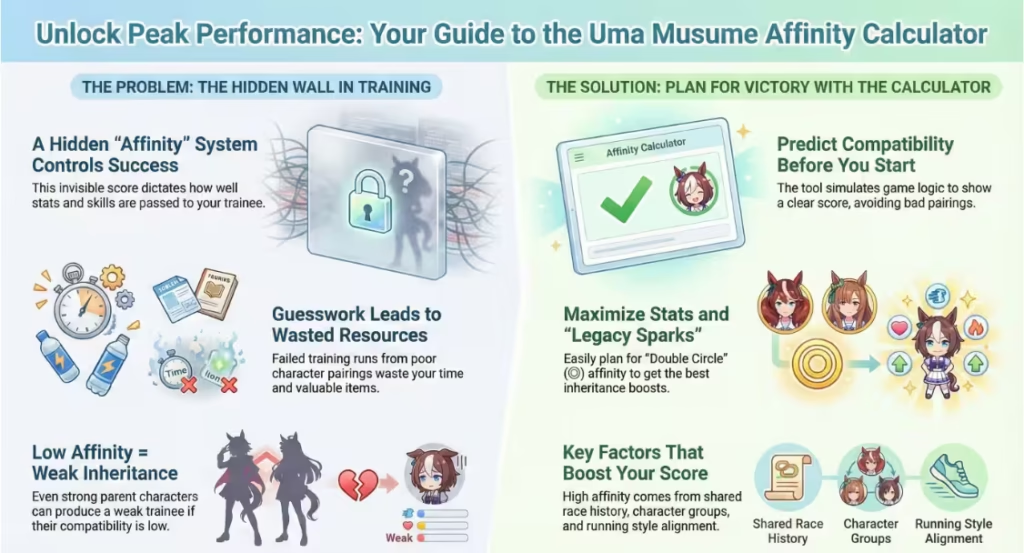
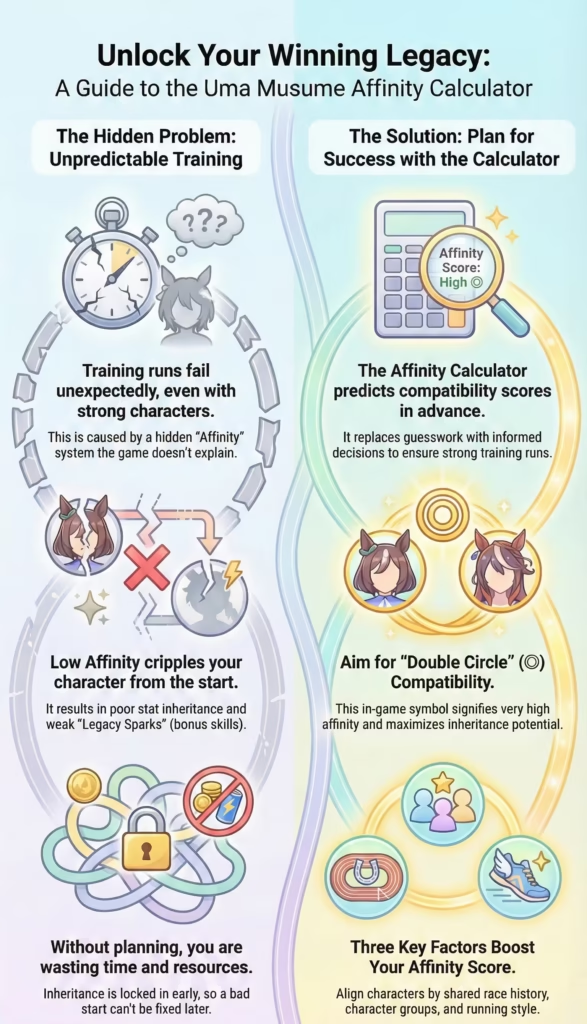
The calculator works by simulating the game’s internal compatibility logic using known data and community research. Players input a main character, legacy parents, sub-legacies, and support levels. The tool then evaluates shared traits, race history, and group data to generate a compatibility score. This process mirrors how the game determines inheritance outcomes. The main benefit is speed and clarity. Instead of starting multiple test runs, players can adjust inputs and instantly see results. The calculator does not claim access to official formulas, but its predictions match in-game behavior closely. Used correctly, it becomes a planning assistant rather than a guessing tool. Understanding each step ensures players trust the results and avoid common input mistakes.
Step 1: How Do You Select the Main Character?
The main character is the trainee you plan to raise during the career run. This choice affects all compatibility results because inheritance is calculated relative to this character. Different trainees belong to different internal groups and have unique race histories. Selecting the correct main character first ensures that all later calculations remain accurate. Many players mistakenly change legacy parents without rechecking the trainee, leading to misleading results. The calculator uses the main character to compare shared traits with parents, so accuracy here is essential. If you are planning multiple runs, always reset and reselect the trainee before testing new combinations. Treat the main character as the reference point that anchors every compatibility calculation.
Step 2: What Are Support Levels (SL 1–1, SL 1–2, SL 2–1, SL 2–2)?
Support Levels, often abbreviated as SL, represent the strength and relationship depth of legacy parents and their sub-parents. These values influence how much each legacy contributes to the final compatibility score. Many players ignore these fields, yet they significantly change results. SL 1–1 and SL 1–2 usually represent the first parent’s lineage, while SL 2–1 and SL 2–2 represent the second parent’s side. Higher support levels increase effective compatibility. Incorrect or empty SL values can lower scores even when characters seem perfect together. The calculator uses these inputs to adjust inheritance weight. Understanding and filling support levels correctly leads to more accurate predictions and avoids confusion when results seem lower than expected.
Step 3: How Do You Choose Legacy Characters and Sub-Legacies?
Legacy characters act as parents and grandparents for inheritance. The two main legacy parents have the largest impact, while sub-legacies provide additional bonuses. Parent compatibility affects primary stat inheritance, while grandparent compatibility supports spark generation. Many players focus only on parents and ignore sub-legacies, missing potential gains. A common mistake is selecting strong characters without checking shared traits or race overlap. The calculator helps identify balanced lineages rather than popular picks. Good legacy planning mixes compatible parents with supportive grandparents. This approach leads to stable results across many runs. By testing different family trees in the calculator, players can find combinations that work consistently instead of relying on trial and error.
Step 4: What Does the “Recommend” Button Actually Do?
The “Recommend” button automatically suggests legacy characters that produce higher compatibility with the selected trainee. It works by scanning available data and ranking characters based on predicted affinity. This feature is useful for beginners or players with large rosters. However, it should not replace manual thinking in all cases. The button cannot account for personal goals, such as targeting specific skills or distance builds. Advanced players often use it as a starting point, then refine results manually. Transparency matters here: recommendations are based on known patterns, not hidden official data. Trust the button for quick setups, but manual optimization remains better for competitive or event-focused training plans.
Step 5: How Is the Compatibility Score Calculated?
The compatibility score is calculated using a weighted combination of shared groups, race overlap, traits, and support levels. Each factor contributes a portion of the final value. The calculator translates this number into familiar symbols like single or double circles. Low scores indicate weak inheritance potential, while high scores suggest strong stat and spark results. Double circle scores sit at the upper end of the range. The tool avoids claiming an official formula and instead reflects observed in-game outcomes. Players should read scores as guidance, not guarantees. A high score improves odds but does not remove randomness entirely. Interpreting scores correctly helps players set realistic expectations for each career run.
What Factors Influence Compatibility Scores in Uma Musume?
Compatibility scores are shaped by several layered factors working together. No single element determines the outcome. Instead, the game combines character data, race history, and trait alignment. This is why two strong characters can still have poor compatibility. Understanding these factors helps players read calculator results with confidence. It also explains why some unexpected pairings perform well. The calculator highlights these influences clearly, making hidden mechanics easier to understand. By learning what affects scores, players can predict results even before using the tool. This knowledge reduces dependency on trial runs and builds long-term planning skill. The following factors are the most important contributors to compatibility outcomes.
Shared Character Groups & Hidden Traits
Each Uma Musume belongs to internal character groups that are not fully shown in-game. Characters in the same or related groups gain compatibility bonuses. Hidden traits also play a role, such as narrative connections or design groupings. These elements explain why certain pairings consistently score high despite different race styles. Players often overlook this factor because it is never directly explained. The calculator includes these group relationships based on community testing. Shared groups raise base compatibility and improve spark chances. This is why some characters feel “naturally compatible” across many trainees. Recognizing group influence helps players plan lineages that remain effective even after game updates.
G1 Race Wins and Career Overlap
Race history strongly affects compatibility. When characters share G1 race wins or similar career paths, their affinity increases. This reflects shared experience within the game’s logic. Characters that dominate similar race calendars tend to work well together as legacy parents. Players who ignore race overlap often see lower-than-expected scores. The calculator accounts for known race data, helping players spot strong overlaps quickly. This factor is especially important for distance-focused builds, such as long or middle distance runners. Planning legacy parents with overlapping G1 wins leads to more reliable inheritance and stronger early-game stats for the trainee.
Distance, Style, and Growth Alignment
Distance preference, running style, and stat growth rates all influence compatibility. Characters aligned in these areas tend to support similar builds, improving inheritance effectiveness. For example, pairing two speed-focused runners often yields better speed sparks. Mismatched styles can lower compatibility even if characters are popular choices. Growth alignment also matters because it affects how inherited stats scale during training. The calculator evaluates these similarities to adjust scores. Understanding this factor helps players build focused teams instead of mixed ones. Alignment does not mean copying builds exactly, but shared direction improves consistency. This approach leads to smoother career progression and better final stat distribution.
Why Certain Characters (Like Winning Ticket) Give Bonus Affinity
Some characters, such as Winning Ticket, are known for giving higher compatibility across many pairings. This usually comes from favorable group placement, race history, and trait connections. These characters act as flexible legacy options that fit many trainees. Players often notice their impact through repeated strong results. The calculator reflects this behavior by showing higher base scores when such characters are selected. However, relying only on these characters can limit variety. Understanding why they work allows players to find alternatives with similar traits. Bonus affinity characters are helpful tools, but smart planning remains more important than copying popular picks.
Key Features of Our Uma Musume Affinity Calculator
The strength of an affinity calculator depends on accuracy, clarity, and trust. This tool is built with those priorities in mind, using well-tested logic rather than guesses. Every feature focuses on helping players make better decisions before starting a career run. Instead of overwhelming users with numbers, the calculator presents results in a clear and practical way. It works smoothly across devices and gives instant feedback as inputs change. These features matter because compatibility planning is often repeated many times when testing different ideas. A reliable tool saves effort, reduces confusion, and builds confidence in the results. Below are the main features that make this calculator useful for both casual players and serious planners.
Accurate Compatibility Logic Based on Community Research
The calculator uses compatibility logic built from extensive community testing and long-term observation of in-game results. Since the official formula is not public, experienced players have compared hundreds of career runs to identify consistent patterns. These findings form the backbone of the calculator’s logic. Shared character groups, race overlap, and trait alignment are all weighted based on how they behave in real gameplay. This approach avoids exaggerated claims and focuses on what actually works. Accuracy comes from repetition and verification, not theory alone. As a result, the calculator produces scores that closely match in-game inheritance outcomes. Players can rely on it for planning because it reflects how the game behaves in practice.
Fast, Responsive, Mobile-Friendly Interface
A planning tool should never slow players down, especially when testing many combinations. This calculator is built to load quickly and respond instantly to input changes. Whether used on a desktop, tablet, or phone, the layout adjusts smoothly for easy reading and selection. Buttons are clear, text is readable, and no unnecessary animations interrupt the process. Mobile friendliness is especially important because many players plan runs on the same device they use to play. A slow or cluttered interface discourages experimentation. By keeping the interface clean and responsive, the calculator supports quick testing and comparison. This speed encourages players to explore more ideas instead of settling for the first result.
Smart Character Search and Filtering
With a growing roster of characters, manual scrolling quickly becomes frustrating. The calculator includes a smart search and filtering system that helps users find characters fast. Players can type part of a name and instantly narrow the list. Filters help group characters logically, reducing mistakes during selection. This is useful for players with large accounts and for those testing specific themes, such as distance or style builds. Accurate selection matters because a single wrong input can change results completely. Smart search reduces these errors and speeds up the planning process. By making character selection simple, the calculator keeps focus on strategy instead of navigation.
Real-Time Results with No Page Reloads
Every change made in the calculator updates the compatibility score instantly. There is no need to refresh the page or press extra buttons. This real-time feedback allows players to see how each choice affects results. For example, switching one sub-legacy immediately shows whether the score improves or drops. This makes learning much easier because cause and effect are visible right away. Real-time updates also support quick comparison between similar setups. Players can test multiple ideas in minutes instead of restarting the process each time. This feature turns the calculator into a learning tool, not just a result checker, helping players understand compatibility behavior more clearly.
Semantic Recommendations (Not Random Picks)
The recommendation feature is based on compatibility logic, not random selection. When the tool suggests characters, it considers shared traits, race overlap, and group alignment with the selected trainee. This makes the suggestions meaningful and reliable as starting points. For newer players, recommendations provide guidance without requiring deep system knowledge. For experienced players, they help confirm ideas or highlight options that may have been overlooked. The system does not claim perfection and works best when combined with manual review. By using semantic logic instead of chance, the calculator builds trust and avoids misleading results that waste time or resources.